RC4 is leaving Kerberos for good. Here is what breaks and how to migrate before July 2026
Introduction
For about twenty years, Windows domain controllers have quietly accepted RC4-HMAC as a fallback encryption type for Kerberos tickets. It was never a good idea, but it kept old appliances and forgotten service accounts working, so it stayed. That ends this year. Microsoft has tied a staged rollout to CVE-2026-20833 and the last stop on that timeline is a July 2026 update that takes the rollback switch away. After that, RC4 is gone from the KDC path unless you have explicitly carved out an exception per account.
If you run Active Directory, this is an authentication-outage risk with a fixed deadline, not a cleanup task you can keep deferring. Here is what is actually changing, what tends to break, how to hunt for it with the tooling you already have and the migration path that keeps you out of trouble.
The vulnerability behind the change
CVE-2026-20833 was published on January 13. 2026 and is classed as use of a broken or risky cryptographic algorithm in Windows Kerberos. The short version: an authenticated attacker can ask the KDC for service tickets in a weak encryption type and then crack the service account password offline. This is Kerberoasting and RC4 makes it cheap. RC4 keys in Windows derive from the NTLM hash with no salt and no iteration, so a captured RC4 service ticket can be fed to Hashcat and brute-forced far faster than an AES-encrypted one.
The attack needs no admin rights. A foothold on any domain-joined client is enough to request tickets for every SPN in the domain, and the cracking happens off the wire where your event logs never see it. Service accounts are the prize, because they tend to be over-privileged and rarely rotated. That is the exposure Microsoft is closing by making AES the assumed default.
Worth saying plainly: there is no widely published proof-of-concept exploit for this specific CVE and trackers report limited evidence of active exploitation. That does not lower the urgency. The point of the change is to remove a class of cheap offline attacks across the whole install base and the deadline applies whether or not anyone is currently hitting you.
The three phases and what each one actually does
Microsoft split this into a calendar rollout so you have runway to find your RC4 dependencies before anything breaks.
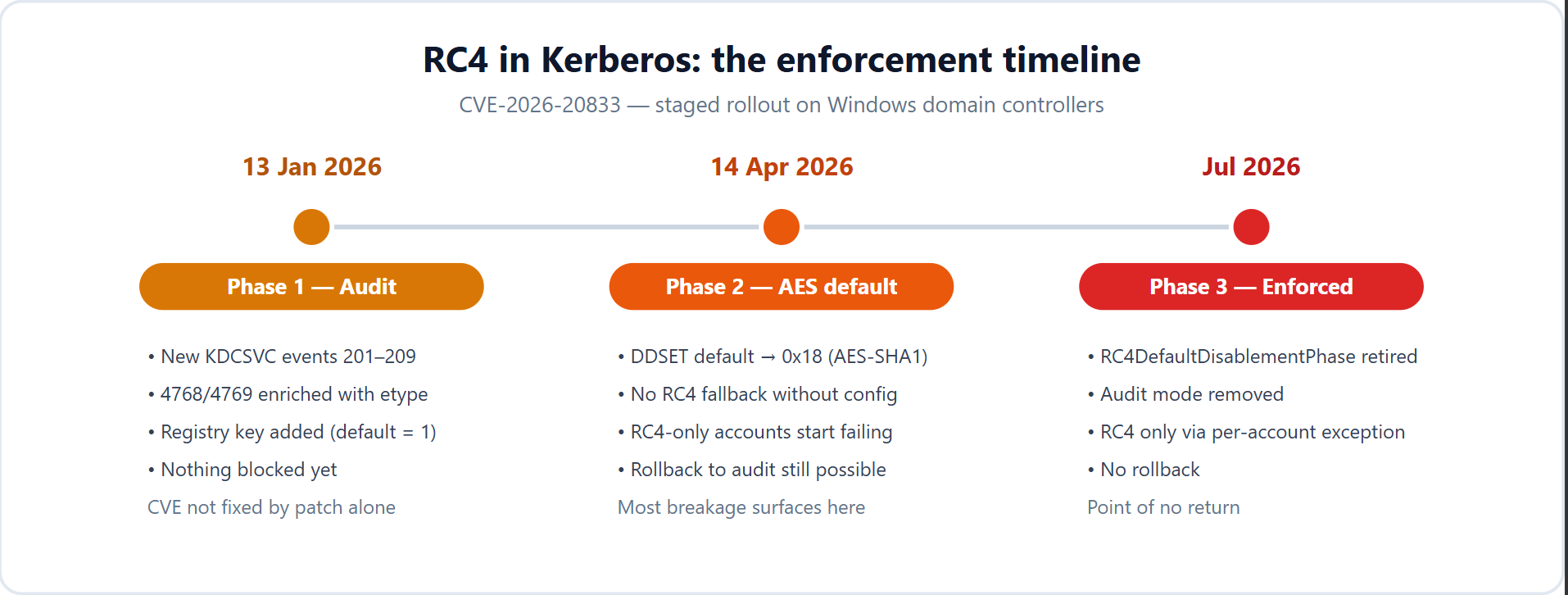
January 13, 2026 (audit). The update is diagnostic only. It adds nine new KDCSVC events (IDs 201 through 209) to the System log on domain controllers, enriches the existing security events 4768 and 4769 with encryption-type detail and introduces a temporary registry value called RC4DefaultDisablementPhase. Nothing is blocked yet. Out of the box the value sits at phase 1, which means warning events only. One thing people miss: installing the January update does not fix the CVE by itself. To actually mitigate it, you either flip enforcement on manually (set the registry value to 2) once your logs are clean, or you wait for the later updates to do it for you.
April 14, 2026 (default flips to AES). This update changes the default DefaultDomainSupportedEncTypes (DDSET) to 0x18, which is AES-SHA1 only, for any account that does not have an explicit msDS-SupportedEncryptionTypes attribute set. In practice the KDC stops silently falling back to RC4. Anything that still depends on RC4 and has not been fixed starts failing here. A manual rollback to audit mode is still possible at this stage if something goes sideways, but Microsoft treats that as a temporary escape hatch, not a place to live.
July 2026 (no way back). The July update retires the RC4DefaultDisablementPhase registry key entirely and removes audit mode. Enforcement becomes the only state. RC4 is out of the KDC path except for accounts where you have explicitly set msDS-SupportedEncryptionTypes to allow it. There is no rollback after this. If you have not done the migration work by now, you find your remaining RC4 dependencies the hard way.
If you only remember one date, remember July. April was when most breakage should have surfaced; July is when you lose the ability to undo it.
What tends to break
The failure mode is almost always the same: a principal that has only RC4 key material, or a client that only advertises RC4, talking to a DC that will no longer issue an RC4 ticket. The usual suspects:
- Service accounts whose passwords predate AES. AES-SHA1 keys are generated on password change. A service account created on Windows Server 2008 or earlier and never reset since may only hold RC4 keys. SQL Server service accounts, IIS application pool identities, scheduled-task accounts and backup service accounts are common offenders because nobody dares touch their passwords.
- NAS and file shares. Network storage joined to AD over Kerberos fails without an AES configuration. Older Synology firmware, QNAP, and NetApp show up here, as do FSLogix profile shares behind Azure Virtual Desktop and RDS.
- Printers and multifunction devices. Scan-to-folder and SMB authentication on older HP, Canon, Kyocera and Ricoh devices often still rely on RC4. These rarely get firmware updates on any sensible schedule.
- Linux and Samba. Older Samba setups fall back to RC4. If krb5.conf or smb.conf pins or permits only RC4, authentication breaks once the DCs stop offering it.
- The krbtgt account itself. This is the one that turns a localized outage into a domain-wide one. If krbtgt was created on Server 2008 and never rotated, it may lack AES keys. Fix this carefully and deliberately, because getting it wrong has its own blast radius.
Finding your RC4 dependencies
Start with detection before you change anything. Turn on the two Kerberos audit subcategories on your domain controllers:
Audit Kerberos Authentication Service      -> Success/Failure
Audit Kerberos Service Ticket Operations   -> Success/Failure
The January update enriches events 4768 (TGT request) and 4769 (service ticket request) with five fields worth knowing: msDS-SupportedEncryptionTypes, Available Keys, Advertised Etypes, Ticket Encryption Type and Session Encryption Type. The encryption-type values you care about:
- 0x17 = RC4-HMAC (the thing you are hunting)
- 0x11 = AES128-SHA1
- 0x12 = AES256-SHA1
On a 4769, the ticket encryption type reflects the service account's key, so a 4769 with 0x17 means that service handed out an RC4 ticket and is roastable. On the KDC side, the new KDCSVC warnings tell you what enforcement will do: 201 and 202 flag accounts that will break and they become the blocking errors 203 and 204 once you are enforcing (206/207 and their 208/209 blocking pairs cover the AES-only-configured cases). Event 205 is the odd one out: it fires when you have explicitly configured DDSET to allow something insecure and it never becomes an error, because Microsoft honours an admin's explicit choice. It is there to remind you that you made it.
The two PowerShell scripts (and where to get them)
Microsoft ships two open-source helpers in the microsoft/Kerberos-Crypto GitHub repository (github.com/microsoft/Kerberos-Crypto, under /scripts or here is the direct link: CLICK). They are not installed anywhere by default, so you download them yourself:
- List-AccountKeys.ps1 parses 4768/4769 from the Security log and lists the key types each account actually has. An account that comes back as {RC4} with no AES entries is a guaranteed break at enforcement.
- Get-KerbEncryptionUsage.ps1 summarises which encryption types are in use, with a filter to isolate RC4.
Run them from an elevated PowerShell session on a DC, or remotely against one:
# Accounts that have used RC4 keys in the last 14 days
.\List-AccountKeys.ps1 -Since (Get-Date).AddDays(-14) -ContainsKeyType RC4

# Everything still negotiating RC4, summarised
.\Get-KerbEncryptionUsage.ps1
The scripts are fine for a point-in-time sweep on a single DC. For anything ongoing, or anything across more than a couple of domain controllers, push the events into Sentinel and query them there.
Does Defender for Identity already cover this?
Partly, and it helps to be precise about which question MDI answers, because it is not the same question as "who is using RC4 right now."
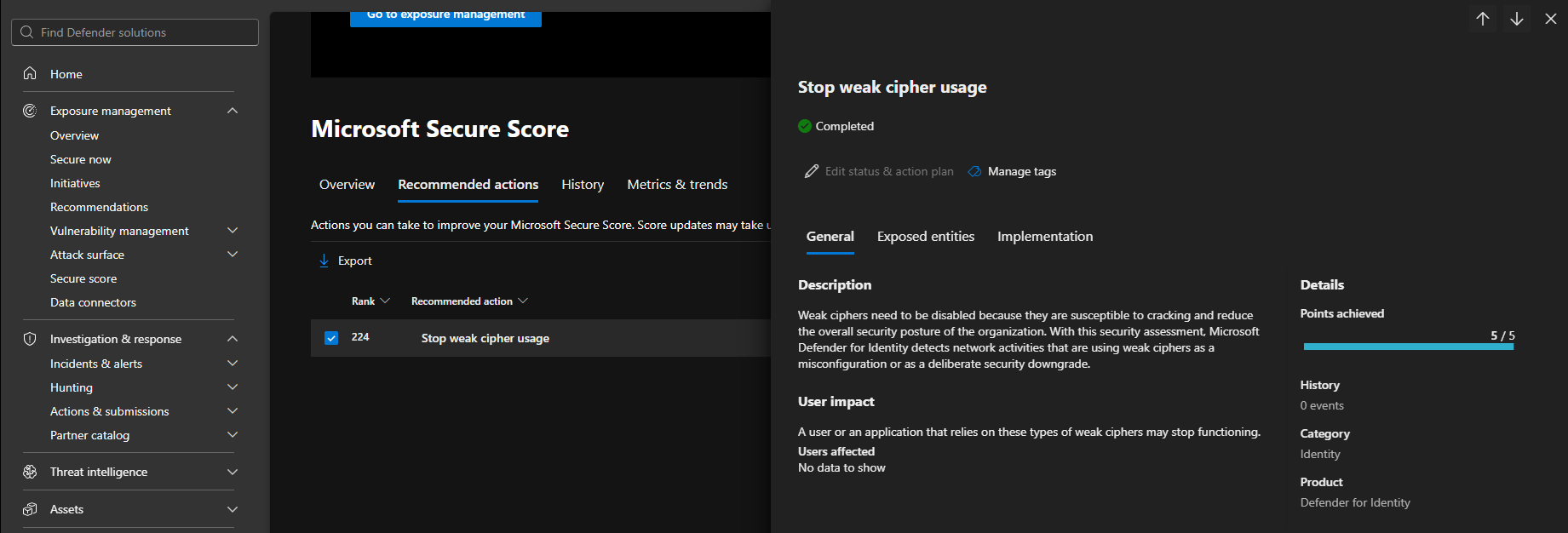
MDI has an identity posture assessment called Stop weak cipher usage, surfaced through Secure Score. It flags identities that are configured to allow weak ciphers (DES, 3DES, RC4), and the exposed-entities list is exportable. That gives you a configuration-level inventory without touching a single event log: which accounts are set up to permit RC4. MDI also carries a related krbtgt assessment that flags an old krbtgt password, which lines up neatly with the krbtgt rotation you need to do anyway.
What MDI does not give you is the per-ticket usage signal. The Kerberos ticket encryption type on each request lives in 4768/4769, and MDI's identity tables (IdentityLogonEvents, IdentityDirectoryEvents, IdentityQueryEvents) do not expose it as a queryable column. The new KDCSVC 201–209 events are Windows System-log events and are not in MDI either. So MDI tells you which accounts are configured weak; it does not tell you which service got handed an RC4 ticket at 02:14 last night, or what April's default flip is about to block.
The practical split:
- MDI posture (Stop weak cipher usage, krbtgt assessment) = the configuration list, continuously maintained, good for the management view.
- Sentinel SecurityEvent 4768/4769 = actual RC4 usage, the list that predicts real breakage and feeds Kerberoasting detection.
- KDCSVC 201–209 (System log) = what enforcement will warn on versus block, per DC.
Use all three. They answer different parts of the same question.
The MDI "Weak Cipher" recommendation:
Hunting RC4 with KQL
Once the DC Security and System logs are flowing into Sentinel (collect 4768/4769 and the KDCSVC System events via an AMA data collection rule), the inventory becomes a query rather than a scripting exercise. A few that earn their place.
RC4 service tickets and TGTs, last 14 days. The baseline hunt:
WindowsEvent
| where TimeGenerated > ago(14d)
| where EventID in (4768, 4769)
| where Channel == "Security"
| extend Etype   = tostring(EventData.TicketEncryptionType),
         Account = tostring(EventData.TargetUserName),
         Service = tostring(EventData.ServiceName),
         Client  = tostring(EventData.IpAddress)
| where Etype == "0x17" // RC4-HMAC
| summarize Requests = count(),
            FirstSeen = min(TimeGenerated),
            LastSeen  = max(TimeGenerated)
    by Account, Service, Etype, Computer
| sort by Requests desc
RC4-only service accounts. This is the one that actually predicts who breaks, because an account that sometimes uses AES will survive the default flip. You want the accounts that never do:
let lookback = 30d;
WindowsEvent
| where TimeGenerated > ago(lookback)
| where EventID == 4769 and Channel == "Security"
| extend Service = tostring(EventData.ServiceName),
         Etype   = tostring(EventData.TicketEncryptionType)
| where Service !endswith "$"
| summarize Etypes = make_set(Etype), Requests = count() by Service
| extend UsesRC4 = set_has_element(Etypes, "0x17"),
         UsesAES = set_has_element(Etypes, "0x11") or set_has_element(Etypes, "0x12")
| where UsesRC4 and not(UsesAES)
| sort by Requests desc
What enforcement will block versus warn about. Reading the KDCSVC events straight tells you how much pain April and July are going to cause, before they cause it:
WindowsEvent
| where TimeGenerated > ago(7d)
| where Channel == "System"
| where Provider has "Kdcsvc" or Provider has "Key-Distribution-Center"
| where EventID between (201 .. 209)
| extend Severity = case(
    EventID in (203, 204, 208, 209), "BLOCKED (enforcement)",
    EventID == 205, "Insecure DDSET configured",
    "WARNING (pre-enforcement)")
| summarize Count = count() by EventID, Severity, Computer
| sort by Severity asc, Count desc
Bridge it to the actual threat. The deprecation exists because of Kerberoasting, so it is worth pointing the same data at the behaviour. One identity pulling a pile of distinct RC4 service tickets in a tight window is what roasting prep looks like:
WindowsEvent
| where TimeGenerated > ago(7d)
| where EventID == 4769 and Channel == "Security"
| extend Etype     = tostring(EventData.TicketEncryptionType),
         Service   = tostring(EventData.ServiceName),
         Requestor = tostring(EventData.TargetUserName),
         IpAddress = tostring(EventData.IpAddress)
| where Etype == "0x17"
| where Service !endswith "$"
| summarize DistinctSPNs = dcount(Service),
            SPNs = make_set(Service, 40)
    by Requestor, IpAddress, bin(TimeGenerated, 1h)
| where DistinctSPNs >= 10
| sort by DistinctSPNs desc
Add identity context. A flat list of RC4 accounts is less useful than the same list sorted by how much a compromise would hurt. If you have UEBA / identity data, enrich it:
let rc4 = WindowsEvent
    | where TimeGenerated > ago(14d)
    | where EventID == 4769 and Channel == "Security"
    | extend Etype   = tostring(EventData.TicketEncryptionType),
             Account = tostring(EventData.TargetUserName)
    | where Etype == "0x17"
    | distinct AccountName = tolower(Account);
IdentityInfo
| where TimeGenerated > ago(14d)
| where tolower(AccountName) in (rc4)
| summarize arg_max(TimeGenerated, AccountDisplayName, IsAccountEnabled, AssignedRoles, Tags)
    by AccountName
Two practical notes. First, 4769 is one of the highest-volume events a DC produces, so filter at the DCR (collect only what you need) and lean on the low-volume KDCSVC events for steady-state monitoring; keep the heavy 4769 queries for the inventory pass. Second, if you run this across tenants, these are per-workspace queries: fan them out with union workspace(...) or run the equivalent in Defender XDR's multi-tenant advanced hunting rather than hopping between portals.
The migration
Work through it risk-first. Do not flip enforcement until discovery and remediation are genuinely done.
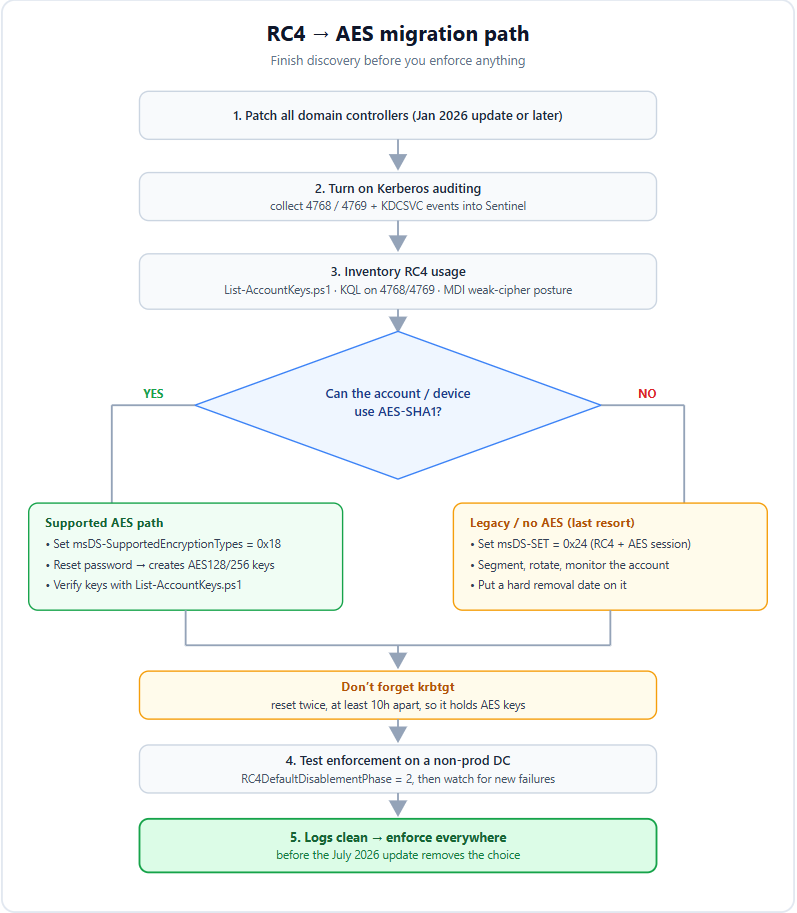
- Inventory and prioritise. Centralise 4768/4769 and the KDCSVC events, run the helper scripts or the KQL above and sort by exposure. Privileged service accounts with SPNs go first. Production third-party appliances next. Lab and retirement-bound kit last.
- Fix the service accounts. For each affected account, set msDS-SupportedEncryptionTypes to AES (0x18) explicitly, then reset the password. The reset is what generates the AES128-SHA96 and AES256-SHA96 keys, so the attribute change alone does nothing until the password changes. Verify with List-AccountKeys.ps1 that AES key material now exists. Plan a maintenance window, because the service has to pick up the new password.
- Rotate krbtgt, carefully. Reset krbtgt so it holds AES keys. The supported guidance is to reset it twice, waiting at least ten hours between resets, so you do not invalidate every outstanding ticket and cause a self-inflicted outage. Use Microsoft's documented reset procedure, run it in a change window, and document it.
- Deal with the appliances. For NAS, printers and Linux hosts, the right fix is a firmware or config update that enables AES. Where the vendor has no path, you have a decision to make, covered below.
- Test enforcement before it is forced on you. Set RC4DefaultDisablementPhase = 2 on a non-production DC (or a test OU's worth of DCs) to simulate the April behaviour and watch the queries above for new failures. This is how you find the dependency you missed.
- Enforce broadly only once the logs are clean and stakeholders have signed off.
When you genuinely cannot move off RC4
Sometimes a legacy appliance has no AES-capable firmware and no replacement budget before the deadline. Microsoft leaves a door open, but it is a last resort and you should treat it as one. Set msDS-SupportedEncryptionTypes on that specific account to 0x24, which is RC4 with AES session keys, scoped to just that principal. The domain-wide alternative, setting DDSET to 0x24 on every KDC, leaves your entire domain exposed to exactly the attack this change exists to stop, so avoid it unless you have no other option at all.
If you do keep an RC4 exception, wrap it in compensating controls. Put the account and service on a segregated VLAN, give it a long random password and rotate it on a short schedule, monitor its ticket activity, and put a hard date on the migration so the exception does not quietly become permanent. An RC4 carve-out without a removal plan is just deferred risk with paperwork.
Where to start this week
Patch your domain controllers with the January 2026 update or later if you have not already, switch on Kerberos auditing, and get one clean inventory of which accounts and devices still touch RC4. Pull the MDI weak-cipher posture for the configuration view and run the RC4-only-service-accounts query for the usage view; where those two lists overlap is your priority work. Everything after that is execution against a deadline you do not control, and the deadline is July.
Sources:
- https://support.microsoft.com/en-us/topic/how-to-manage-kerberos-kdc-usage-of-rc4-for-service-account-ticket-issuance-changes-related-to-cve-2026-20833-1ebcda33-720a-4da8-93c1-b0496e1910dc
- https://msrc.microsoft.com/update-guide/vulnerability/CVE-2026-20833
- https://learn.microsoft.com/en-us/windows-server/security/kerberos/detect-remediate-rc4-kerberos
- https://github.com/microsoft/Kerberos-Crypto/tree/main/scripts
- https://www.microsoft.com/en-us/windows-server/blog/2025/12/03/beyond-rc4-for-windows-authentication/
- https://techcommunity.microsoft.com/discussions/microsoft-security/kerberos-and-the-end-of-rc4-protocol-hardening-and-preparing-for-cve%E2%80%912026%E2%80%9120833/4502262
- https://learn.microsoft.com/en-us/openspecs/windows_protocols/ms-kile/6cfc7b50-11ed-4b4d-846d-6f08f0812919
- https://learn.microsoft.com/en-us/troubleshoot/windows-server/windows-security/kerberos-protocol-registry-kdc-configuration-keys
- https://learn.microsoft.com/en-us/defender-for-identity/security-posture-assessments/accounts
- https://windowsforum.com/threads/rc4-deprecation-in-windows-kerberos-plan-aes-migration-for-ad.399164/
- https://mint-secure.de/rc4-in-kerberos-wird-abgeschaltet-was-unternehmen-jetzt-tun-muessen/
- https://4sysops.com/archives/windows-kerberos-rc4-deprecation-what-will-break-in-active-directory-and-how-to-fix-it/