Microsoft Entra Tenant Governance: Overview, setup and licensing
How many tenants does your organization have?
Shadow tenants are easy to describe and hard to find. A test tenant from a finished project, a tenant that came with an acquisition, one a developer set up with a company credit card. They sit outside your central policies, often have a single remaining Global Admin, and never show up in an assessment. What was missing so far was a way to find them from inside Entra.
Microsoft built Entra Tenant Governance for exactly this. Let’s go through what it does, how setup works, what it costs in licenses, and where I see its limits.
What Tenant Governance does
Tenant Governance bundles four capabilities under Tenant governance in the Entra admin center. Each one builds on the previous.
The first is discovery. It looks for tenants that have an observable relationship with yours, based on B2B collaboration, multitenant app usage and shared billing accounts. The result is a "Related tenants" list with activity data that you classify yourself.
Tenants you find can be brought in through a governance relationship. It connects a governing tenant to a governed tenant. The direction is fixed, and the governed tenant has to accept every relationship. Policy templates define what the relationship provisions: which Entra roles go to which security groups in the governing tenant, and which custom multitenant apps get deployed.
For ongoing control there's configuration monitoring. You describe a tenant's desired state as a JSON baseline and let a monitor check it on a schedule. Microsoft says more than 200 resource types are covered across Entra, Intune, Exchange Online, Teams, Purview and Defender. Deviations show up as drift, with actual and expected values side by side.
The fourth is secure tenant creation. New tenants can be created as "Governed Workforce" tenants. They're tied to your main tenant from the first minute, and the billing asset keeps a recovery path open if the last admin leaves or the tenant is compromised.
For admins, delegated administration is the part you'll notice most. Members of the authorized group open an admin portal with the tenant ID appended, for example https://entra.microsoft.com/{tenant-id}, and sign in with their own account. No local admin accounts, no B2B guests holding Global Admin. Under the hood, the governed tenant receives GDAP role assignments and updated cross-tenant access settings.
Not every capability is available in every license tier. I cover that in its own section below, because it changes how you'd plan a rollout.
Licensing: Basic vs. Premium
Tenant Governance comes in two tiers. Basic is included in Entra ID P1 and P2, and with them in Microsoft 365 E3, E5 and Business Premium. Premium is included in Entra ID Governance, and with it in Entra Suite and Microsoft 365 E7.
The licensing model is per admin, not per user. Microsoft's slides state that you need one license for each administrator who uses Tenant Governance capabilities, and that the feature doesn't require a license for every user in the tenant.
| Capability | Basic (Entra ID P1 / P2) | Premium (Entra ID Governance) |
| Configuration monitoring and drift reporting | Up to 800 resources per tenant per day, up to 30 monitors | Additional 10 resources per tenant per day for each license |
| Configuration snapshots | Up to 20,000 resources per tenant per month, up to 12 active snapshot jobs | Additional 35 resources per tenant per month for each license |
| Related tenant discovery | No | Yes |
| Governance relationship with GDAP | Yes | Yes |
| Governance relationship with custom app injection | No | Yes |
| Secure tenant creation with governance relationship | Yes | Yes |
Two things stand out. First, discovery is Premium only. With P1 or P2 you can govern tenants you already know about, but you can't use Entra to find the ones you don't. Second, Premium capacity scales with license count: 100 Entra ID Governance licenses would add 1,000 monitored resources per tenant per day on top of the Basic limit.
Setup in five phases
Microsoft's deployment guide splits the rollout into five phases that build on each other. Most steps need the Tenant Governance Administrator role. Granting permissions for configuration monitoring needs Global Administrator or Privileged Role Administrator.
1. Enable discovery (Premium). Go to Tenant governance > Related tenants and select Discover related tenants. Be aware that this setting can't be reversed. It can take several days until signals are populated. Then classify each tenant. Microsoft suggests three buckets: known and acceptable (partners, vendors), requires governance (internal, unclear ownership) and potentially risky (unknown, no business reason). For the last group Microsoft documents a separate quarantine process.
2. Create policy templates. Under Tenant governance > Templates you define which roles go to which groups. One detail with consequences: template changes don't apply to existing relationships. You have to send a new request, and the governed tenant has to accept it again. If you plan to use secure tenant creation, also create a template with the ID default.
3. Set up relationships. If both tenants share a billing account, a two-step handshake is enough: the governing tenant sends a request (valid for 14 days) and the governed tenant accepts. Without shared billing it takes three steps, started by the governed tenant with an invitation (valid for 30 days). Afterwards, check that the relationship object, cross-tenant access settings, GDAP assignments and service principals exist in both tenants.
4. Use delegated administration. Add admins to the groups named in the template, then work in the governed tenant through the portal URL with its tenant ID.
5. Set up configuration monitoring. First grant the required Graph permissions under Configuration management permissions (for Conditional Access, for example, Policy.Read.All) plus any roles. For Exchange, Security and Compliance this happens in the respective admin centers. Then build the baseline, either by hand or from the current configuration using the snapshot APIs. Each baseline holds up to 200 resource instances, and a monitor runs every six hours. The daily limit across all monitors depends on your license tier (see the table above).
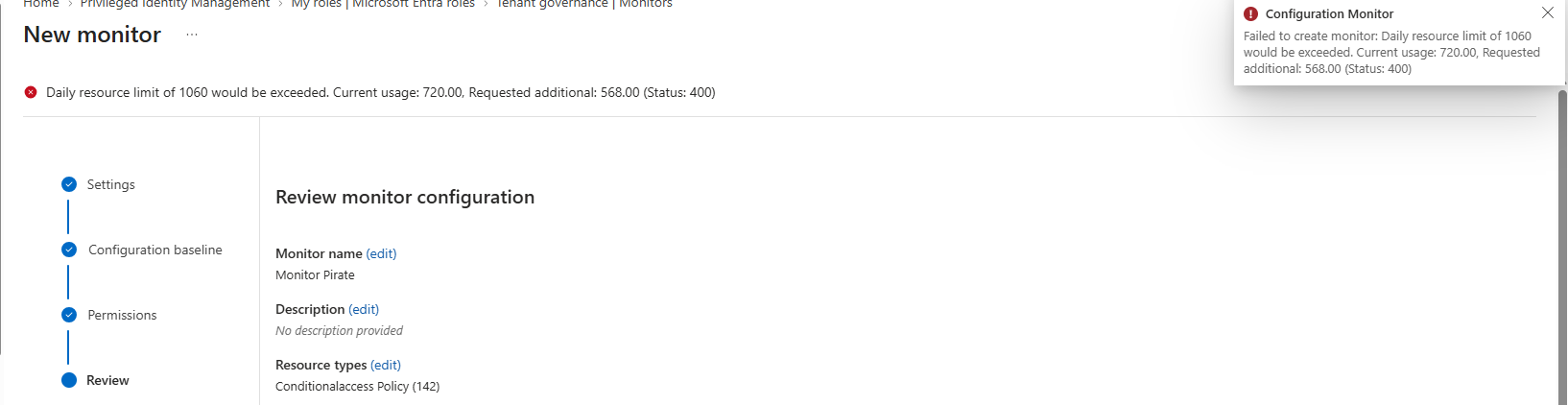
You resolve drift in one of two ways: fix the resource or update the baseline if the deviation is intended. The next run then marks the drift as resolved.
Scenarios
Three scenarios show how the capabilities of Tenant Governance work together in practice.
Scenario 1: Our main tenant
The main tenant is our production environment and has to stay in an approved, compliant state. While it's in that state, we take a snapshot: a point-in-time export of the current configuration for the resource types we select, stored as JSON. That snapshot becomes our baseline, and a monitor flags any change against it, such as a modified Conditional Access policy. The drift report shows what changed, so we can restore the setting or update the baseline if the change was intended. The main tenant is also our governing tenant, where the policy templates for scenario 2 live.
Scenario 2: Our test tenants
Each test tenant has a governance relationship with the main tenant. That gives our admins delegated access: they're members of a security group in the main tenant, the policy template assigns that group the required Entra roles in the test tenant, and they sign in with their main tenant account. We don't need separate admin accounts or B2B guests with admin roles in every test tenant. If a test tenant no longer needs that access, it can end the relationship on its side.
In our test tenants we try out a lot of new features, which means configuration changes all the time. Sometimes we need to know exactly what changed and when. A monitor in each test tenant makes configuration drift visible, so deviations surface quickly instead of weeks later.
Scenario 3: An external IT service provider
The same model works when the admins sit in another company. Not every organization has its own IT department. Picture Company A, a small organization with its own Entra tenant and limited IT resources, and Company B, an IT service provider responsible for Company A's identity security.
Company A wants Company B to create, change and maintain Conditional Access policies, but without giving the partner permanent Global Administrator access and without creating a separate account for every one of the partner's admins. With Tenant Governance, Company B's tenant becomes the governing tenant and Company A's tenant the governed one. Since the two don't share a billing account, Company A starts the three-step handshake with an invitation. The policy template then assigns Company B's admin group a role that fits the job, such as Conditional Access Administrator, instead of Global Administrator. Company B's admins sign in with their own accounts, and Company A can monitor what the governing tenant's admins do in its tenant.
My take: Where it helps and where it falls short
For me the biggest win is discovery. Until now, shadow tenants could only be found with custom scripts, billing exports or by simply asking around. Now Entra delivers a list with signals. That alone makes the feature worth a look, even if you never set up a single governance relationship. The catch is that it needs Premium licensing.
The second win is delegated administration. In many environments admins manage secondary tenants through local cloud-only accounts or B2B guests with high privileges. Those are standing privileged identities that nobody keeps track of after a while. With governance relationships, access is tied to groups in the main tenant, and the governed tenant can revoke it.
There are points I'd clarify before a rollout:
• Discovery can't be turned off again. I'd document enabling it as a deliberate decision and agree upfront who reviews the results and what happens to risky tenants.
• Template changes need re-acceptance in every governed tenant. With three tenants that's fine, with thirty it isn't. Plan your templates carefully before you roll them out.
• Configuration monitoring detects drift, but it doesn't fix it. It doesn't replace configuration-as-code pipelines; it's the control layer next to them.
• Baselines are JSON. For teams without experience in Graph resources that's a real hurdle. The snapshot APIs help because they give you the current state as a starting point.
•Partners managing customer tenants will ask about Azure Lighthouse. Lighthouse delegates Azure resources but doesn't grant Entra directory roles. Tenant Governance covers exactly that gap, so the two don't exclude each other.
• Because licensing is per admin, check how many people actually need Tenant Governance capabilities. That number drives the cost, not your user count.
In my own tests the snapshot wizard had a few rough edges. On the Permissions step it lists the least-privilege permissions each resource type needs.
For Conditional Access policies alone that's seven read permissions, including Policy.Read.All, Application.Read.All, Group.Read.All and User.Read.All. A link takes you straight to Manage permissions for the configuration management service, where you grant them.
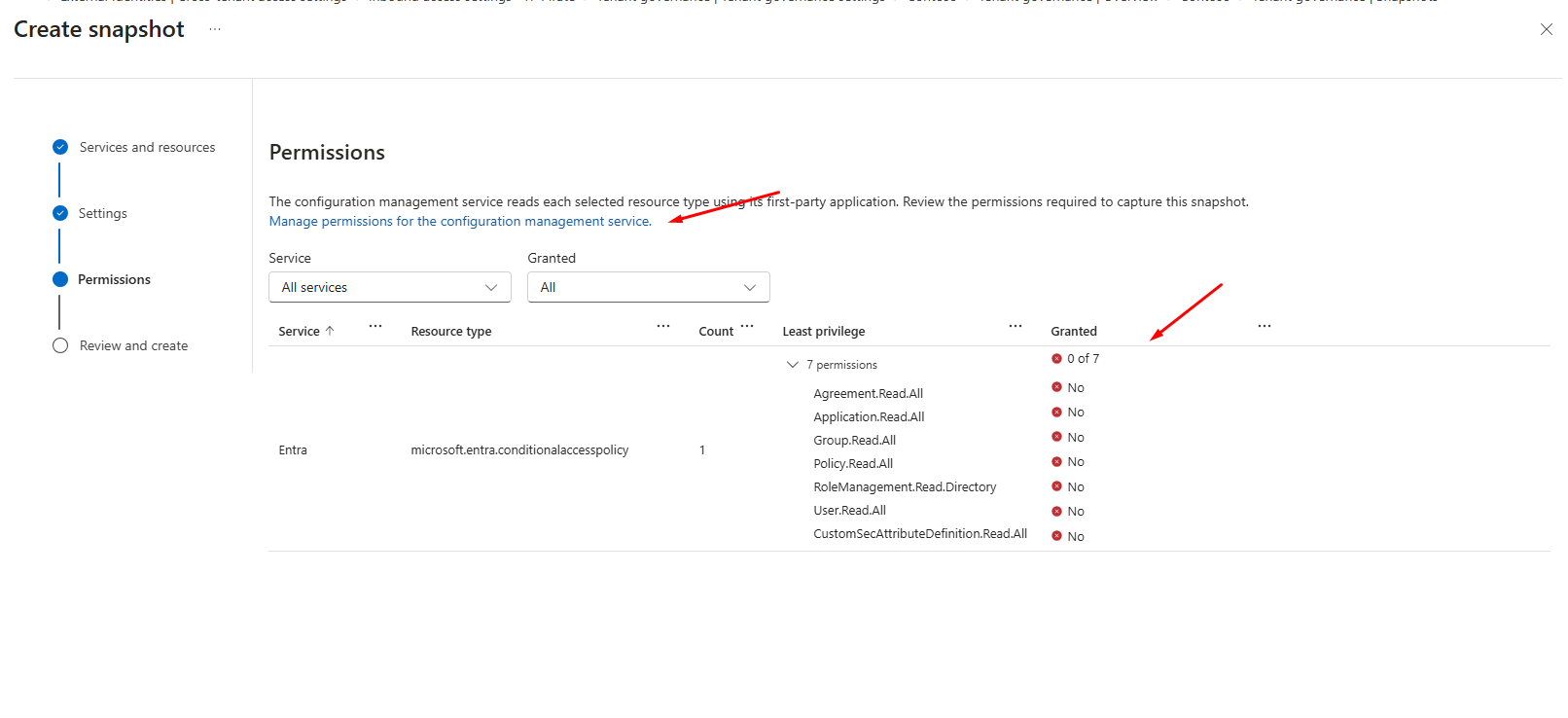
The catch: the Granted column doesn't refresh after you've granted them, and there's no refresh button. I had to go to the next step and back before the wizard showed every permission as granted. If you create the snapshot before that, it fails. That's exactly what happened to me, because I clicked through the wizard too quickly.
And Regenerate on a failed snapshot doesn't retry it. It creates a new snapshot.

A snapshot can also finish as Partially successful.

That sounds worse than it is, because the error panel tells you exactly what went wrong :D.
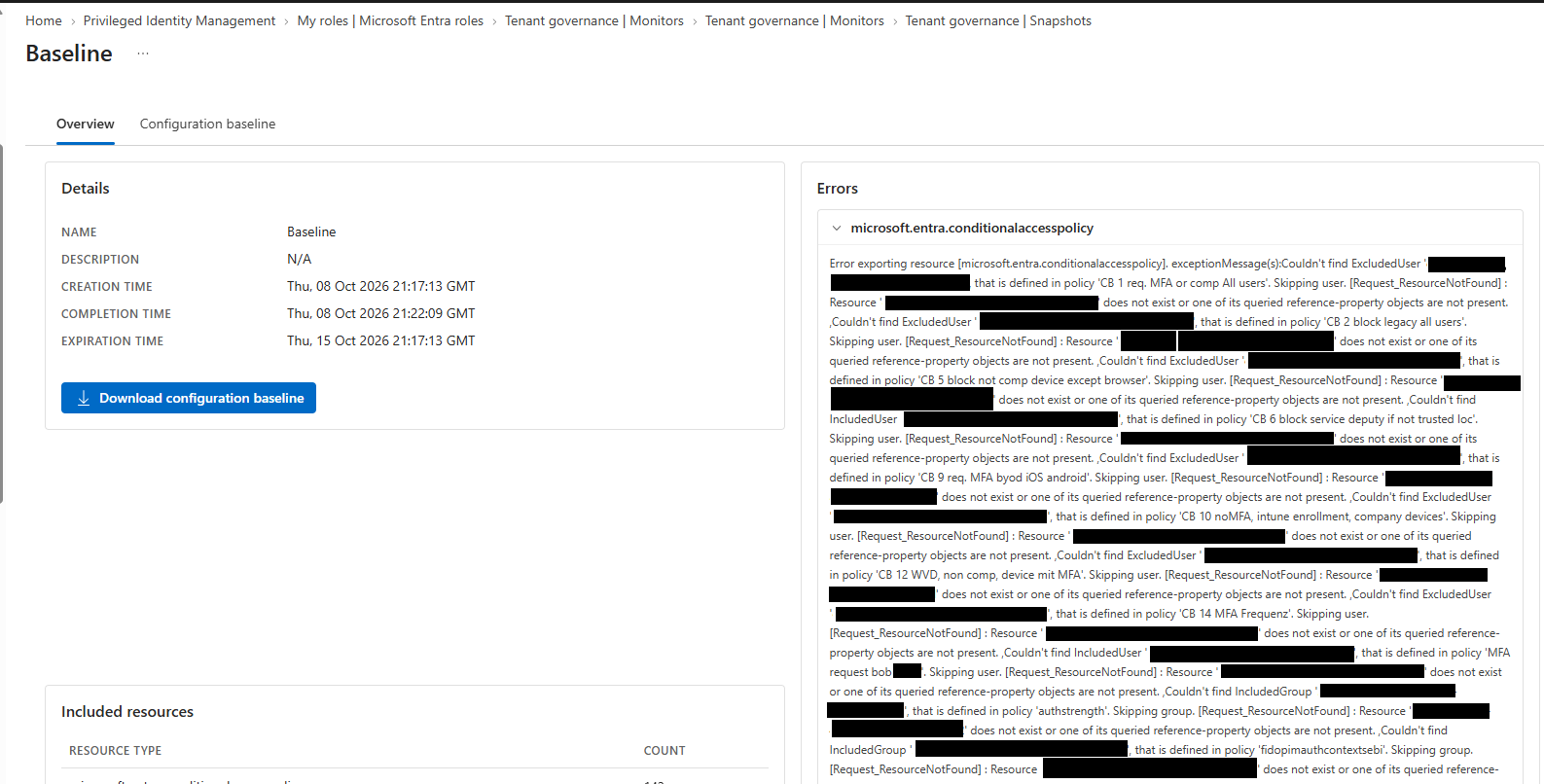
In my case the Conditional Access policies still referenced included or excluded users and groups that no longer exist in the tenant. That's a useful cleanup list on its own.
My suggestion for getting started: if you have Premium, enable discovery and classify the results. In parallel, put a first monitor on your production tenant, for example covering Conditional Access policies. That works with Basic too and gives you solid findings within a few weeks, without any relationships to other tenants yet.
Sources
• Deploy Microsoft Entra Tenant Governance end to end
• Microsoft Entra Tenant Governance is now generally available
• Microsoft Entra licensing
• Quarantine unsanctioned tenants