
The Data Security MVP – Three Colors, Three Policies, One Foundation
The problem: classification fails at complexity
In the first article, we argued that the Data Security Index 2026 describes where organizations should be, but not how to get there. This second article is the how. We call it the Data Security MVP: four pillars, three colors, three DLP policies, and a practical Insider Risk Management baseline – all built on Microsoft Purview, all verified against Microsoft Learn, all deployable in weeks.
Let us start with the problem. In nearly every first engagement, we find the same pattern: a classification schema designed years ago in a workshop, with five to seven tiers, sub-groups, footer rules, and differentiated protection per container type. It looks impressive on paper. It was signed off by the CISO, the DPO, and the works council. And nobody uses it.
The reason is cognitive load. The person writing a document does not want to choose between seven labels whose differences they cannot remember. So they pick the lowest one, or none at all. The result: a classification coverage in the low single digits. The schema exists in policy. It does not exist in practice.
Pillar 1: The traffic light labeling model
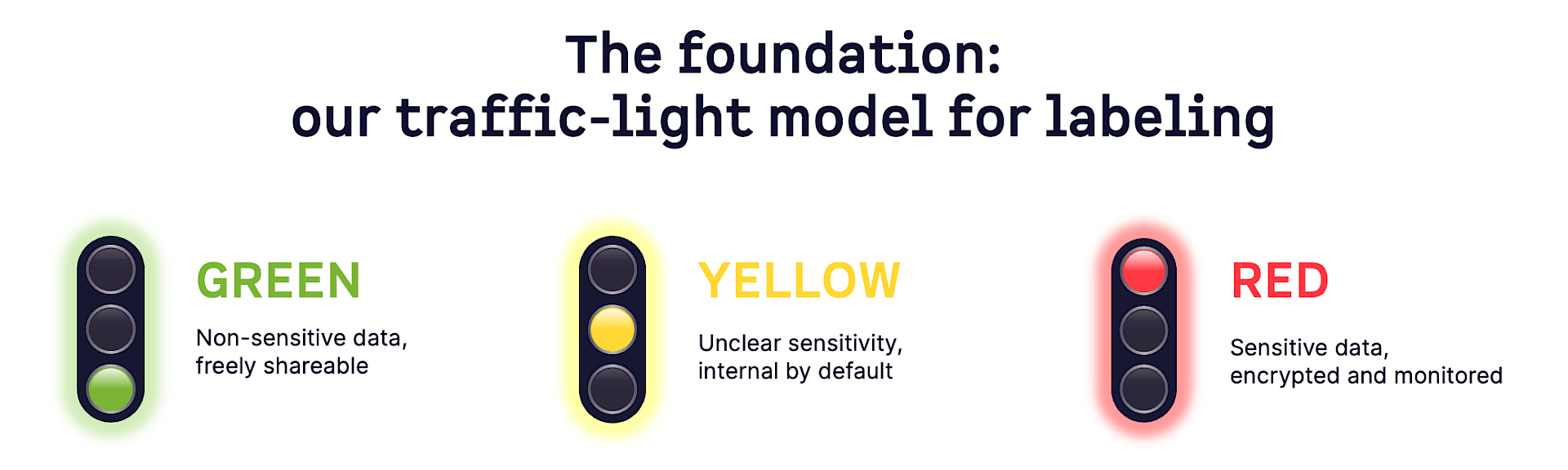
The MVP replaces this with three Sensitivity Labels, configured in Microsoft Purview Information Protection, using the universally understood traffic light metaphor.
Green: Data that is not sensitive and may be shared freely, including externally. No encryption, no restrictions.
Yellow: Data of unknown or uncertain sensitivity. Should remain inside the company by default but may be shared externally with a valid business reason. Yellow carries three sub-labels (Yellow – Default, Yellow – All Company, Yellow – Individual) that control the encryption scope, but the top-level choice remains one click.
Red: Data you already know is sensitive or that has been classified by users or automated systems. Requires encryption and DLP controls. External sharing is blocked unless explicitly approved.
The key design decision is the default label. In the Sensitivity Label publishing policy, we configure Yellow as the default label for documents and emails. When a user creates a new Word, Excel, or PowerPoint document, the Yellow label is applied automatically when the file is first saved. No user action required. This is standard Purview functionality: you configure it under Information Protection → Label policies → Default label for documents.
The effect is significant. Every new document starts in a protected state. If someone wants to share it externally without restriction, they must actively downgrade to Green. That downgrade creates a justification prompt (configurable in the label policy’s “Require a justification for changing a label” setting), generates an audit log entry, and gives DLP a signal to work with. The system does not rely on users remembering to classify. It relies on users remembering to declassify – and that is a fundamentally different cognitive model.
Pillar 2: Three DLP policies that enforce the traffic light
Data Loss Prevention in Microsoft Purview uses Sensitivity Labels as conditions in DLP rules. This is supported across Exchange Online, SharePoint Online, OneDrive for Business, Teams, and endpoints via the Purview Endpoint DLP agent. We build exactly three policies, each mapped to the traffic light model.
Policy 1 – Green: Block Unlabeled
This policy catches documents that carry no Sensitivity Label at all and are being shared externally.
Condition: “Content is shared from Microsoft 365 with people outside my organization” AND “Content does not contain any sensitivity label.”
Action: Block with override.
The user can still share, but must provide a business justification. The override is logged, and an alert goes to the security team. This single policy eliminates the biggest blind spot in most environments: completely unclassified content leaving the organization without anyone ever having considered its sensitivity.
Policy 2 – Yellow: Block Override
This policy applies to all Yellow-labeled content being shared externally.
Condition: “Content is shared from Microsoft 365 with people outside my organization” AND “Content contains any of these sensitivity labels: Yellow, Yellow/Yellow – Default, Yellow/Yellow – All Company, Yellow/Yellow – Individual.”
Action: Restrict access to the content for external users, notify users with email and policy tips, send alerts to administrators.
The user can override with justification. Since Yellow is the default label, this means the entire document estate starts in a state where external sharing is gated.
Policy 3 – Red: Block External
This policy blocks all external sharing of Red-labeled content. No override.
Condition: Same sharing condition, label condition targets Red.
Action: Block.
Exceptions are possible through a defined approval process, not through a dialog click. Red content stays internal.
Three policies. Configurable in hours. Covering Exchange, SharePoint, OneDrive, Teams, and endpoints. Not perfect, not exhaustive, but a real, enforceable boundary where none existed before.
Pillar 3: Insider Risk Management baseline
Microsoft Purview Insider Risk Management correlates signals to identify potential malicious or inadvertent insider risks. Built with privacy by design, users are pseudonymized by default, and role-based access controls plus audit logs ensure user-level privacy. We activate three policies using built-in IRM policy templates, each tied to a specific triggering event.
Policy 1 – Green: Security Violation
Uses the “Security policy violations” template.
Triggering event: A security violation detected by Microsoft Defender for Endpoint on the user’s device. Once triggered, IRM evaluates whether the user’s surrounding activity shows data exfiltration patterns.
Prerequisite: Defender for Endpoint must be onboarded and integrated with Insider Risk Management via Settings → Intelligent detections → Microsoft Defender for Endpoint.
Policy 2 – Yellow: Data Leak DLP
Uses the “Data leaks” template.
Triggering event: A High Severity DLP policy alert. Once triggered, IRM looks at the broader context of the user’s data movement – file downloads, prints, cloud uploads, USB copies – to determine whether the DLP alert is an isolated event or part of a larger pattern.
Prerequisite: At least one DLP policy must be configured to generate High Severity alerts (which the Yellow and Red MVP policies do).
Policy 3 – Red: Departing User Data Theft
Uses the “Data theft by departing users” template.
Triggering event: A resignation or termination date recorded by the Microsoft 365 HR connector, or automatic detection of an Entra ID account deletion. Once triggered, IRM monitors for exfiltration patterns in the weeks surrounding the departure: downloading files from SharePoint, printing, copying to personal cloud services. This is the most common real-world IP theft scenario, and the most defensible from a works council perspective because the trigger is a concrete HR event, not behavioral suspicion.
These three policies map directly to the three most frequent insider risk categories Microsoft documents: security violations, data leaks, and departing-user theft. They give the works council a clear, bounded explanation of exactly when the system fires and when it does not. That specificity turns a hostile conversation into a constructive one.
Pillar 4: Reasonable defaults
Defaults are the most underestimated tool in data security. We have already covered the Yellow default label, which shifts cognitive load from classification to conscious declassification. We combine it with additional defaults:
- SharePoint sites are created without external sharing enabled
- Teams are created with private visibility
- OneDrive sharing links default to internal recipients only
Each is overridable, but the starting position is secure. The philosophy: secure by default, override by exception, audit everything
The bridge to Adaptive Protection
Once these four pillars are in place, the MVP connects naturally to Microsoft Purview’s Adaptive Protection. Adaptive Protection dynamically integrates Insider Risk Management with DLP and Entra ID Conditional Access: when IRM detects a user engaging in risky behavior, the user is assigned an insider risk level (Elevated, Moderate, or Minor), and DLP policies referencing the “User’s risk level for Adaptive Protection is” condition automatically adjust enforcement. A user whose IRM risk level rises to Elevated can be blocked from sharing externally in real time, without manual intervention. This is the bridge the MVP deck shows as the triangle connecting Information Protection, DLP, and Insider Risk Management. It requires all three to function. Without the MVP labels, IRM has no classification signals. Without the MVP DLP policies, Adaptive Protection has nothing to tighten. The MVP is not optional infrastructure. It is the precondition for Adaptive Protection to work.
What the MVP delivers – and what it does not
At the end of an MVP project, typically six to twelve weeks, the organization has:
- A classified data estate where every new document carries a protection level from the moment of creation
- An enforceable DLP boundary covering the primary M365 workloads and endpoints
- An Insider Risk baseline covering the three most common real-world scenarios
- Defaults that shift friction to the right places
- The preconditions for Adaptive Protection
What it does not have:
- A full DSPM implementation
- AI-powered investigations
- Autonomous remediation agents
- A granular classification tree mapping every regulatory sub-type
- A DLP policy for Microsoft 365 Copilot interactions
All of that comes in the maturity path we describe in the third article.
The MVP is not the destination. It is the foundation from which every subsequent step becomes viable. Build it first, and the world the Data Security Index describes becomes reachable. Skip it, and even the most ambitious AI strategy produces nothing but noise.