Agents Are Already in Your Tenant. Here's How to Control Them.
Agents Are Already in Your Tenant. Here's How to Control Them.
During the first two months of the Microsoft Agent 365 preview, Microsoft said that tens of millions of agents appeared in the Agent 365 Registry. That number was not a projection it actually represented agents visible across participating customer environments.
But one distinction matters immediately: an entry in the Agent 365 Registry is not necessarily an identity in Microsoft Entra Agent ID.
Agent 365 can inventory Microsoft, third-party, shared and unmanaged agents. Microsoft Entra shows and governs the subset that has an Entra agent identity. Older Copilot Studio agents may still authenticate through conventional service principals, and third-party or custom agents usually need to be registered, synchronised or instrumented before they receive the full Agent 365 and Agent ID control set.
For identity and security administrators, the first task is therefore not to assume that every registry entry is already governed. It is to determine which agents exist, which identities they use and which controls actually apply to them.
What Microsoft Entra Agent ID Created
Microsoft's key design decision wasn't to build another AI management portal. It was to treat AI agents as identities.
Just as users, applications, and workloads have identities in Entra ID, agents now have dedicated identity objects that can be governed, monitored, assigned ownership, and secured through existing enterprise controls. At the center of the model is the Agent Identity Blueprint, which acts as the parent object for one or more agent identities.
An Agent Identity is a specialized service principal created from an Agent Identity Blueprint. Authentication is anchored in the blueprint, which holds the credentials and authentication configuration used to obtain tokens on behalf of the agent identities it creates.
Think of the blueprint as the trust anchor and template. The agent identity is the runtime instance. One blueprint can create many agent identities, all sharing common authentication and identity characteristics while still allowing individual permissions and configuration where required.
Microsoft's goal isn't to manage agents one by one. It's to establish governance, ownership, and security controls at scale.
Understanding the Object Model
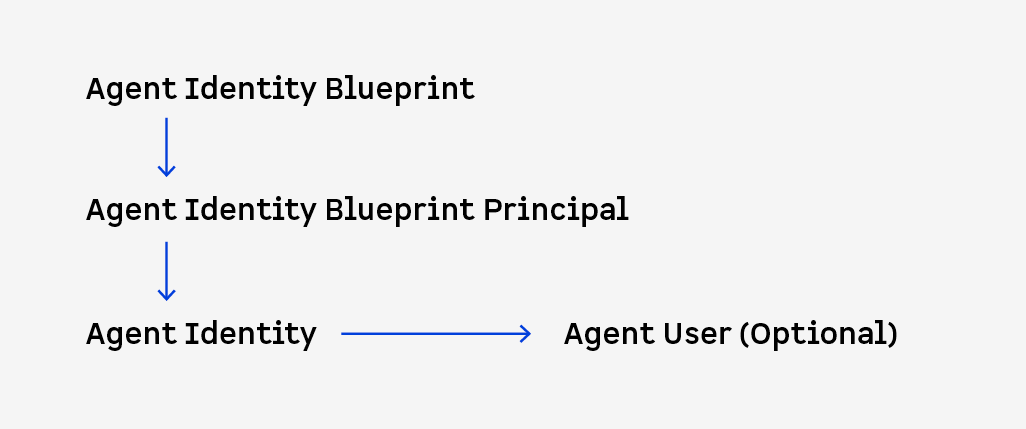
Agent Identity Blueprint
The parent object that defines authentication settings, ownership, sponsorship, permissions, and common configuration.
Agent Identity Blueprint Principal
The service principal representation of the blueprint within the tenant. It participates in permission assignment and token-related operations behind the scenes.
Agent Identity
The actual non-human identity used by an AI agent to access resources.
Agent User (Optional)
Some agents receive a user-like representation rather than existing solely as service principals. This allows them to participate naturally in workloads such as Teams, Outlook, and other collaboration experiences where a display name, presence, or persona is desirable.
Ownership Matters More Than Technology
Both blueprints and agent identities support governance relationships through owners and sponsors.
• Owners administer and manage the agent.
• Sponsors provide business accountability.
The distinction matters. An owner can configure an agent. A sponsor answers the question every auditor, governance team, and incident responder eventually asks:
Why does this agent exist, and should it still have access?
As agent populations grow, knowing who is accountable becomes just as important as knowing what permissions were granted.
The Two Access Models You Need to Understand
Two access patterns determine how agents interact with systems and what an attack would actually expose.
Autonomous Mode
Agents act using app-level permissions such as:
• Microsoft Graph application permissions
• Entra app roles
• Azure RBAC assignments
• API-specific service permissions
The agent acts independently and can continue operating without a signed-in user.
On-Behalf-Of (OBO) Mode
The agent acts using delegated permissions inherited from the signed-in user. In this model, the agent's access is constrained by the user's own privileges.
Understanding which model an agent uses should be one of the first steps in any governance or risk assessment effort.
Why the Old Identity Playbook Doesn't Fully Carry Over
Agents don't sign in interactively. No browser, no MFA prompt, no device check, no session with a login screen you can put a Conditional Access challenge in front of. Authentication is machine-to-machine, token-to-token. That means a chunk of the Zero Trust toolkit built for humans, step-up authentication, device compliance, sign-in risk based on IP and browser fingerprint, simply doesn't apply the same way. Current Conditional Access capabilities for agents are more limited than those available for human users and focus primarily on policy enforcement, risk-based controls, and access governance rather than interactive authentication challenges.
What's genuinely new is the risk profile:
• Agent sprawl occurs because anyone with a Copilot Studio license can spin one up.
• Over-privileged agents driven by overly broad permission scopes
• Tool misuse emerge when an agent is manipulated into calling a legitimate tool for an illegitimate purpose.
• And prompt injection, which doesn't have a clean equivalent in the human identity world at all it's an attack on the agent's reasoning, not on its credentials.
Microsoft Products & Features Matrix for AI Agent Governance
Microsoft didn't build one product for this. It extended three it already had: Entra, Purview, Defender and put a fourth on top to manage them together.
| Product | Key Features for Agents | Role in Agent Security |
| Microsoft Entra Agent ID | • Agent Identity Blueprints (Parent templates) | Identity and access layer responsible for authentication, authorization, accountability, and risk-aware access decisions. |
| Microsoft Entra ID Governance | • Entitlement Management (Access Packages for agents) | Permissions and lifecycle management that prevent standing access, enforce periodic reviews, and reduce orphaned identities. |
| Microsoft Agent 365 | Unified Agent Registry (Discovers Copilot Studio, Azure AI Foundry, AWS, and custom framework agents) | Central inventory and control plane that provides visibility into an organization's AI agent ecosystem. |
| Microsoft Purview | • DSPM for AI (Data Security Posture Management) | Data protection layer responsible for preventing oversharing, monitoring data exposure, and maintaining auditability. |
| Microsoft Defender XDR / Cloud | • Agent Activity Mapping | Detection and response layer that helps identify malicious behavior, compromise attempts, and suspicious agent activity. |
A Deployment Sequence That Works
1. Start with Inventory (Agent 365): Identify your baseline population. Separate your Registry-Only Agents, Unmanaged agents and Entra-Governed Agents before writing a single policy.
2. Assign Sponsors and Owners: Every blueprint and identity should have both a technical owner and a business sponsor. Incident response starts with accountability.
3. Migrate Standing Permissions to Access Packages: Remove direct role assignments on agents. Wrap permissions in Entitlement Management with defined expiration windows.
4. Deploy Conditional Access in Report-Only Mode: Target the Agent Risk condition (focusing on API spikes and abnormal token behavior) and layer custom security attribute policies for sensitive targets. Evaluate report-only logs to understand baseline agent telemetry before toggling enforcement.
5. Turn On Purview DSPM for AI: Enable data logging and prompt guardrails in parallel with identity controls to capture immediate audit trails.
6. Enable Defender Activity Mapping: Map agent-to-agent communication pathways once your fleet expands beyond manual tracking limits.
7. Consolidate in Agent 365: Use the control plane to aggregate operational signals across your governed agent inventory.
What Entra Still Doesn't Do for You
A few gaps are worth knowing going in, because they'll surprise you mid-rollout otherwise. Custom Entra role definitions don't currently support actions for managing agent identities, so you can't build a fine-grained custom admin role for this the way you might for other object types. The standard admin-consent workflow doesn't behave correctly for permissions requested by agent identities if a user's consent gets blocked by risk-based step-up, there's no workaround; the flagged risk has to be resolved first, or the tenant admin has to grant the permission directly.
And audit logs don't distinguish agent identities from other identity types by default everything lands in the ApplicationManagement category, so if you're building SIEM queries or compliance reports, you'll need to filter on the object type yourself rather than expecting a clean "agent" label out of the box.
The important takeaway isn't that Microsoft has completely solved agent governance. |